


Redirect applicants to custom confirmation pages after form submission.
By default, applicants will remain on the page they submitted the application form from and will see a confirmation message. However, you can redirect applicants to a custom confirmation page on your website instead.
Simply create the custom confirmation page on your website, then enter the URL of that page in the CTMS under Administration > Configuration > Web Integration > General (default) – URL to redirect visitors to after submitting an application.
If you have a Multi-Site CTMS, you can set a unique URL for each site/location under Administration > Entities > Edit Site >Web Integration “Thank You” page for this site location.
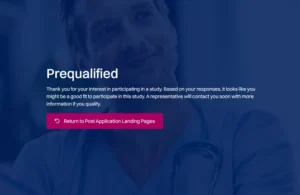
Studies that include pre-screening questionnaires redirect to custom “Prequalified” or “Not Prequalified” pages on your website.
Simply create the custom “Prequalified” and “Not Prequalified” pages on your website, then enter the URLs in the CTMS under Administration > Configuration > Web Integration > URLs for subjects Included / Excluded by Interview Questions
| Cookie | Duration | Description |
|---|---|---|
| cookielawinfo-checbox-analytics | 11 months | This cookie is set by GDPR Cookie Consent plugin. The cookie is used to store the user consent for the cookies in the category "Analytics". |
| cookielawinfo-checbox-functional | 11 months | The cookie is set by GDPR cookie consent to record the user consent for the cookies in the category "Functional". |
| cookielawinfo-checbox-others | 11 months | This cookie is set by GDPR Cookie Consent plugin. The cookie is used to store the user consent for the cookies in the category "Other. |
| cookielawinfo-checkbox-necessary | 11 months | This cookie is set by GDPR Cookie Consent plugin. The cookies is used to store the user consent for the cookies in the category "Necessary". |
| cookielawinfo-checkbox-performance | 11 months | This cookie is set by GDPR Cookie Consent plugin. The cookie is used to store the user consent for the cookies in the category "Performance". |
| viewed_cookie_policy | 11 months | The cookie is set by the GDPR Cookie Consent plugin and is used to store whether or not user has consented to the use of cookies. It does not store any personal data. |
Complete the form below to access the full report.